January 21, 2012
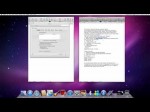
On the Mac, Open the Internet sharing as follows: 1.Go to System preferences “Sharing” 2.Then Share your connection from: Ethernet To computers using: Airport. (if you want to enter a wep key on the internet sharing go to Airport options make sure it automatic and enter a five diget password its got to be on 40-bit make sure it got numbers and letters) Then go to System preferences again go to “Network”. 1- Select Airport and go in “Advanced Settings”. 2 – Select “Airport” and check the box: “Remember the networks that this computer was connected. 3 – Select TCP / IP 3.1- Configure IPv4: Off 3.2- Configure IPv6 Automatically 4 – Select DNS 4.1: Add two DNS servers. – 8.8.8.8 and – 8.8.4.4 Regarding the Mac, it’s done. Finish by the PS3 1 – Select the network settings Personified. 2 – Continue to “Ip address setting”Selected “Manually” 3 – Enter these values: IP: 10.0.2.2 Mask: 255.255.255.0 Router: 10.0.2.1 DNS1: 8.8.8.8 DNS2: 8.8.4.4 go to custom-scan-click on your mac wireless internet-and go to manually-and there finish at first enter no wep kep but if you want one so noone can use your as a hot spot i sugest you to put in a wep key but at first when trying it do not use one Part 2 Finish by ps3 www.youtube.com Add me on Facebook www.facebook.com Follow me on twitter twitter.com if u cant add me as a friend on facebook just look up this email, oscar.perez535@gmail.com
Tags: airport, automatically, connect, diy, easy, facebook, finish-at-first, howto & style, internet network problem, network, networks, ps3, select, wireless
Posted in Internet Network Problem | No Comments »
January 20, 2012
The NC10 seems to have a frequent problem which causes the screen to become all white (or another single color). Forum reports say that moving the display cable around can fix this problem – at least temporary. This video shows how to disassemble the lid, reach LCD panel and the cable, and then how to get everything back together again. Amazingly, this really made the white screen problem go away even nothing was really repaired. First successful cable massage I’ve ever seen 🙂 Update: The problem was completely gone for 6 weeks, then started to reappear. Currently I’m working around it by squeezing the back of the lower right corner of the screen until it goes away again. To fix this permanently you’d probably have to replace the cable, which is difficult because: – you’d have to find a replacement cable (anyone know of a source?) – you’d have to get the new cable through the hinge – you’d have to connect it at both ends, so you’d have to disassemble not only the panel part, but also the keyboard part of your device.
Tags: cable, display, dissassemble, fix, get-everything, howto & style, keyboard, lcd, nc10, permanently, really-repaired, repair, screen, until-it-goes
Posted in Monitor Problem | No Comments »
January 11, 2012
Sorry I had my hand immobilized so I was moving slow !!! I fix basic problems on computers , I’m not a pro on this so you may see lot of thing that the pro do different , all I know about computer I learn by myself never went to technical school for this !!
Tags: benchmark, build, diy, howto & style, overclock, review, setup, ultra
Posted in Slow Working Computer | No Comments »
January 9, 2012
Noise motherboard and don’t recognise the keyboard. If someone could help me fix this it would be greatly appreciated! Compaq Presario SR1340UK Desktop PC AMD athlon 64 3200+ ATI radeon x300
Tags: compaq-presario, do not recognise, greatly-appreciated, howto & style, motherboard, noise computer, not-work, pc problem, presario, problem, radeon-x300, recognise-the-keyboard, yourserenity
Posted in Motherboard Problem | No Comments »
January 6, 2012
Internet Download Manager (IDM) is a tool to increase download speeds by up to 5 times, resume and schedule downloads. Comprehensive error recovery and resume capability will restart broken or interrupted downloads due to lost connections, network problems, computer shutdowns, or unexpected power outages. Simple graphic user interface makes IDM user friendly and easy to use.Internet Download Manager has a smart download logic accelerator that features intelligent dynamic file segmentation and safe multipart downloading technology to accelerate your downloads. Unlike other download managers and accelerators Internet Download Manager segments downloaded files dynamically during download process and reuses available connections without additional connect and login stages to achieve best acceleration performance. ””””””””””””””””””””””””””””””””””””””””””””””””””””””””””””””””””””””””””””””””””””””””””””””””””””’ ♛Download : www.mediafire.com ””””””””””””””””””””””””””””””””””””””””””””””””””””””””””””””””””””””””””””””””””””””””””””””””””””’ ♛Subscribe to my Channel : www.youtube.com …
Tags: 6.07, downloads, graphic-user, howto & style, interface-makes, other-download, redhatz, smart-download
Posted in Internet Network Problem | No Comments »
January 5, 2012
Hello there! I hope u like the video. If u hav any questions please write them on the question area. If u like the video please LIKE it and subscribe to my channel. How to replace the optical drive (DVD) video will be soon up! my twitter: twitter.com7pablosu My Website pablosu.com
Tags: dvd, gamingtoday, how to fix, howto & style, like-the-video, optical-drive, self fix, ssd, technology, video
Posted in CD/DVD Drive Problem | No Comments »
December 31, 2011
LINK:findfiles.com When i updated to windows 7 my animated spinning cursor was not working, it would just freeze at the first frame, i knew it was a driver problem because on boot up, before the driver loaded, it would work fine. I searched many forums, but none had a link to a working driver……..till i finally found a recent driver on dell.com……… findfiles.com
Tags: animated, basic, because-on-boot, Desktop, driver-on-dell, driver-problem, erick, howto & style, recent-driver, software problems, tips & tricks, tutorial
Posted in Software Functioning Abnormally | No Comments »
December 29, 2011

www.empowernetwork.com The Empower Network, from Internet Marketing Super-star David Wood, is a complete system for anyone, newbie to guru, to start from scratch and build an internet empire with a previously unattainable success level. This blog post will share some insights into using a Craigslist account to increase your income in whatever you’re doing online, or off.
Tags: craigslist, craigslist account setup, craigslist marketing, howto & style, internet, internet marketing, overthetopmentor, some-insights
Posted in Internet Network Problem | No Comments »
December 28, 2011
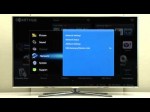
Make sure to follow these steps to troubleshoot this issue. Make sure there is a network connection.(Menu – Network – Network Status) If needed, contact your service provider.
Tags: apps, connections, hdtv, howto & style, internet, issues, led, network-status, pdp, plasma, product, television, troubleshooting
Posted in Internet Network Problem | No Comments »
December 28, 2011
9 steps to help your computer run faster and fix problems.
Tags: clean, Desktop, howto & style, maker, reboot, run, simple, start
Posted in Slow Working Computer | No Comments »



