December 20, 2012
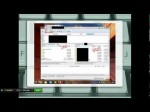
This is handy for those that work from home and deal with transferring web site files over a WiFi network. First and foremost I provide an overview of configuring a router to make it more secure. I discuss how to find the IP address of the router, how to log into the router and change the default usernames and password, how to set up encryption, how to limit connectivity by limiting allowed IP addresses and setting up MAC address filtering, and how to change the name, or SSID, of the router and how to turn off the broadcasting of that name. I make a note of password security and how passwords should be unique across all accounts, and I suggest password management software. (I use: RoboForm) Once the connection is secure I begin to discuss setting up a secure FTP (or FTP) connection so that you can securely transfer web site files to a web server. The video is filmed as a screencast using the web based tool Screenr (free version allows 5 minutes of recording), and I use OpenOffice.org free tool for publishing. In the demonstration I am working in a Windows environment and using FileZilla to create the secure connection. Even if you do not intend to transfer web site files the beginning portion of this video still offers great discussion for securing a wireless network.
Tags: connection, diy, fix set up, the-beginning, transfer-web, using-the-web, video, windows
Posted in Wireless Network Setup | No Comments »
December 20, 2012
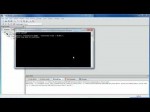
C++ tutorials for code::blocks error “Hello World – Debug” uses an invalid compiler. Probably the toolchain path within the compile the compiler options is not setup correctly?! Skipping… I’ll show you how to fix this problem!
Tags: compile, compiler, diy, not-setup, path-within, problem, science & technology, software problems, the-compile, the-compiler, the-toolchain, toolchain
Posted in Software Functioning Abnormally | No Comments »
December 19, 2012

Here’s everything I’ve tried so far in a list below. – Tried using Internet Explorer (dry heave) no change in speed. – Tried converting to MOV format using Power Director and it converted, but still SLOW. – Tried power cylcling the computer for five minutes. – Tried power cycling the router for five minutes. – Tried contacting my ISP to check for throttling or other issues. – Tried a speed test and passed. – Tried other web sites and they’re fast/fine. – Tried uploading from another computer. Same result. – Tried deleting all Firefox “add-ons” and restored original default settings. – Tried using Firefox in “safe mode” in hopes simplicity would solve it. – Tried refreshing the browser. – Tried uploading directly from Power Director- didn’t work. SOLVED!!!! IT WAS MY ISP
Tags: autos & vehicles, computer repair, diy, firefox, fix it, internet, power, router, seconds-or-less, slow working computer, the-computer
Posted in Slow Working Computer | No Comments »
December 19, 2012

Here’s everything I’ve tried so far in a list below. – Tried using Internet Explorer (dry heave) no change in speed. – Tried converting to MOV format using Power Director and it converted, but still SLOW. – Tried power cylcling the computer for five minutes. – Tried power cycling the router for five minutes. – Tried contacting my ISP to check for throttling or other issues. – Tried a speed test and passed. – Tried other web sites and they’re fast/fine. – Tried uploading from another computer. Same result. – Tried deleting all Firefox “add-ons” and restored original default settings. – Tried using Firefox in “safe mode” in hopes simplicity would solve it. – Tried refreshing the browser. – Tried uploading directly from Power Director- didn’t work. SOLVED!!!! IT WAS MY ISP
Tags: autos & vehicles, computer repair, diy, firefox, fix it, internet, power, router, seconds-or-less, slow working computer, the-computer
Posted in Slow Working Computer | No Comments »
December 19, 2012
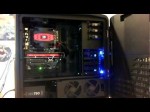
**Feel free to contact me with any questions at all. I love helping out fellow computer enthusiasts, or people who are interested in this. Comments, email, website, twitter, facebook, youtube, anything works guys** Well, here is the completed build. It took us about 4-5 hours on this…we ran into a couple problems, per the video. See the number list below. This computer has been in use, and running stable, since Saturday morning. The thing is kick ass. Obviously graphics are no problem. The most impressive thing is the boot time. It averages at about 22 seconds. I’ve hit as low as 20.1 and as high as 24.8. But the goal was to be at 20 seconds or less, so we’re very close to that. 35-39 C is the temp range – we’re decent there. I’ve also added a magnetic WD 7200 RPM 320 GB hard drive. It was performing the best and fastest of all my HDDs. I didn’t want to slow down the boot by adding a messed up HDD. Bios is the tits. You can use your mouse and there is a full GUI which is very slick. The heatsink is installed to blow in a “down to up” flow. This is to work with the theory that “heat rises”. The chassis has a “top fan” right above the heat sink blowing out of the case. There is also a vent on top of the chassis. There are 2 additional slots for 2 expansion fans within that vent. 1.) Either I’m an idiot, or the heatsink was a little hard to install. 2.) There were a ton of cables in the Cosmos II that are for expansion fans…I didn’t know this and was pretty confused by …
Tags: above-the-heat, completed, couple-problems, diy, expansion-fans, fix it, heatsink, most-impressive, seconds-or-less, slow working computer, video
Posted in Slow Working Computer | No Comments »
December 19, 2012
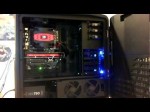
**Feel free to contact me with any questions at all. I love helping out fellow computer enthusiasts, or people who are interested in this. Comments, email, website, twitter, facebook, youtube, anything works guys** Well, here is the completed build. It took us about 4-5 hours on this…we ran into a couple problems, per the video. See the number list below. This computer has been in use, and running stable, since Saturday morning. The thing is kick ass. Obviously graphics are no problem. The most impressive thing is the boot time. It averages at about 22 seconds. I’ve hit as low as 20.1 and as high as 24.8. But the goal was to be at 20 seconds or less, so we’re very close to that. 35-39 C is the temp range – we’re decent there. I’ve also added a magnetic WD 7200 RPM 320 GB hard drive. It was performing the best and fastest of all my HDDs. I didn’t want to slow down the boot by adding a messed up HDD. Bios is the tits. You can use your mouse and there is a full GUI which is very slick. The heatsink is installed to blow in a “down to up” flow. This is to work with the theory that “heat rises”. The chassis has a “top fan” right above the heat sink blowing out of the case. There is also a vent on top of the chassis. There are 2 additional slots for 2 expansion fans within that vent. 1.) Either I’m an idiot, or the heatsink was a little hard to install. 2.) There were a ton of cables in the Cosmos II that are for expansion fans…I didn’t know this and was pretty confused by …
Tags: above-the-heat, completed, couple-problems, diy, expansion-fans, fix it, heatsink, most-impressive, seconds-or-less, slow working computer, video
Posted in Slow Working Computer | No Comments »
December 19, 2012

CALL THE CMX TEAM HOTLINE: MON-FRI 9AM-8PM EST 1-866-547-7004 Ext. 704 VIEW ALL OPPORTUNITIES VIA MY BLOG: www.BobSolis.com SUBSCRIBE TO MY CHANNEL www.youtube.com DOWNLOAD MY AUDIO BOOK NOW FOR FREE tinyurl.com CONTACT ME THRU MY BLOG: bobsolis.com JOIN ME ON FACEBOOK: tinyurl.com FAIR USE NOTICE: This video may contain copyrighted material. Such material is made available for educational purposes only. This constitutes a ‘fair use’ of any such copyrighted material as provided for in Title 17 USC section 106A -117 of the US Copyright Law.
Tags: audio, book, constitutes, copyright, diy, do it your self, section-106, video, video-may
Posted in Internet Network Problem | No Comments »
December 18, 2012
online computer hardware and software solution. You can Troubleshoot scanner, printer, Hard-Disk, Drives, DVD-drive, Antivirus Software, CD-ROM and CD Writer Drives, DVD ROM and Combo Drives, Keyboard, Mouse, Microprocessor, Memory, Power-supply Problems, Floppy Disk Drive, Modems, CMOS, Monitors, Installing Drivers, RAM, Motherboard, BIOS and SCSI Drives.
Tags: antivirus, combo-drives, diy, dvd, entertainment, floppy-disk, installing, keyboard, memory, microprocessor, motherboard, power-supply, supply-problems, writer, writer-drives
Posted in Software Functioning Abnormally | No Comments »